Entity Framework Bulk Update
The BulkUpdate method from Entity Framework Extensions is the most flexible way to update your entities in EF Core and EF6. You can customize exactly how entities are updated, such as by using a custom key, including related entities, updating only specific properties, and much more.
// @nuget: Z.EntityFramework.Extensions.EFCore
using Z.EntityFramework.Extensions;

// Easy to use
await context.BulkUpdateAsync(customers);

// Easy to customize
await context.BulkUpdateAsync(customers, options => options.IncludeGraph = true);
Bulk Update Example
Update with a Custom Key
The ColumnPrimaryKeyExpression and ColumnPrimaryKeyNames options let you match existing entities by using a custom key (or a combination of properties) instead of your entity's mapped primary key before performing the update.
This is particularly useful when synchronizing data from an external system where your entity's primary key is not available.
// @nuget: Z.EntityFramework.Extensions.EFCore
using Z.EntityFramework.Extensions;

// Using `ColumnPrimaryKeyExpression`
context.BulkUpdate(customers, options => options.ColumnPrimaryKeyExpression = x => x.Code);

// Using `ColumnPrimaryKeyNames`
var customKeys = new List<string>() { nameof(Customer.Code) };
context.BulkUpdate(customers, options => options.ColumnPrimaryKeyNames = customKeys);
Update Only Specific Properties
By default, BulkUpdate updates all mapped properties. You can use the following options to control exactly which properties are included in the update:
- ColumnInputExpression lets you specify only the properties you want to update.
- IgnoreOnUpdateExpression lets you exclude specific properties from the update.
// @nuget: Z.EntityFramework.Extensions.EFCore
using Z.EntityFramework.Extensions;

// Update only specific properties
context.BulkUpdate(customers, options => options.ColumnInputExpression = x => new
    {
        x.Name
    });

// Ignore specific properties
context.BulkUpdate(customers,
    options => options.IgnoreOnUpdateExpression = x => x.Code);
Update with Related Entities (Include Graph)
Use this option when you want to update entities and automatically update all related entities (children, grandchildren, and more) linked through navigation properties.
- IncludeGraph: Automatically updates all related entities linked through navigation properties.
- IncludeGraphOperationBuilder: Lets you customize how a specific entity type is updated.
// @nuget: Z.EntityFramework.Extensions.EFCore
using Z.EntityFramework.Extensions;

context.BulkUpdate(invoices, options => options.IncludeGraph = true);
Update with Future Action
Use this option when you want to update entities later instead of executing the operation immediately.
By default, BulkUpdate executes as soon as you call the method.
With future actions, you can queue multiple bulk operations and execute them all at once later.
FutureAction: Adds aBulkUpdateoperation to the pending action queue instead of executing it immediately.ExecuteFutureAction: Executes all pending future actions.
// @nuget: Z.EntityFramework.Extensions.EFCore
using Z.EntityFramework.Extensions;

context.FutureAction(x => x.BulkUpdate(customers));
context.FutureAction(x => x.BulkUpdate(invoices, options => options.IncludeGraph = true));

// ...code...

context.ExecuteFutureAction();
Update with Rows Affected
Use the UseRowsAffected option to retrieve the number of rows affected by the BulkUpdate operation.
This is useful when you need to verify how many rows were actually updated for logging, validation, or reporting.
// @nuget: Z.EntityFramework.Extensions.EFCore
using Z.EntityFramework.Extensions;

var resultInfo = new Z.BulkOperations.ResultInfo();

context.BulkUpdate(customers, options =>
{
    options.UseRowsAffected = true;
    options.ResultInfo = resultInfo;
});

int rowsAffected = resultInfo.RowsAffected;
int rowsAffectedUpdated = resultInfo.RowsAffectedUpdated;
More Examples
Need a scenario not covered here?
There’s a good chance we already support it.
Contact us to discuss your scenario
🔑 Key Benefits
One of the main reasons people use our Bulk Update with Entity Framework is to update their data exactly the way they want — whether that means updating only specific columns, skipping null values, or applying conditional logic. And of course, all that with great performance.
- ✅ Update the way you want: Choose which properties to update, skip
nullvalues, apply conditions, and more. - ✅ Extremely fast: Update thousands or millions of rows in seconds.
- ✅ No need to load entities: Save time and memory by skipping entity tracking.
- ✅ Flexible with hundreds of options: Fine-tune everything — batch size, conditions, behaviors — to match your business logic.
🔍 What is supported?
Our library supports all the common scenarios — and almost everything you can do with EF Core and EF6!
- ✅ The latest Entity Framework Core version: EF Core 10
- ✅ All previous EF Core versions: EF Core 2 to 9
- ✅ All Entity Framework versions: EF6, EF5, EF4, and EF Classic
- ✅ All major database providers: SQL Server, SQL Azure, PostgreSQL, MySQL, MariaDB, SQLite, and Oracle
- ✅ All inheritance mapping strategies: TPC, TPH, and TPT
- ✅ Complex types / owned entity types
- ✅ Enums
- ✅ Value converters (EF Core)
- ✅ And much more — even shadow properties!
🚀 Performance Comparison (SaveChanges vs Bulk Update)
A key benefit of our Entity Framework Extensions library is the performance it provides — but also the fact that you don’t need to retrieve entities from the database, unlike what you usually do with SaveChanges.
With our BulkUpdate from Entity Framework Extensions, you can just create the entities yourself and set only the properties you want to update. That’s it!
For fairness, our online benchmark also includes retrieving entities from the database, so the comparison remains honest and realistic.
📊 Benchmark Results
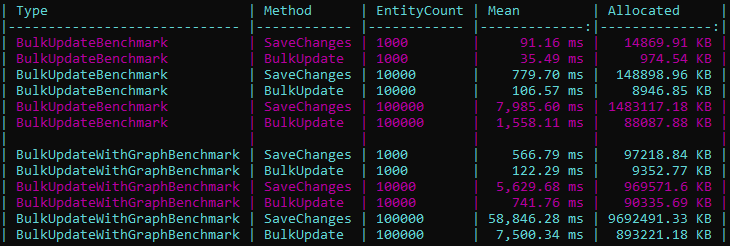
The tables above give you a quick idea of the performance gains when using Bulk Update.
But to give you a more complete picture, we also ran extensive benchmarks across all major database providers with BenchmarkDotNet.
👉 Explore detailed results:
- By provider (EF Core):
- By operation (EF Core):
Here’s an example chart for SQL Server – Bulk Update comparing EF Core SaveChanges vs EF Extensions BulkUpdate:
EF Core vs Entity Framework Extensions
| Operation | 1,000 Entities | 2,000 Entities | 5,000 Entities |
|---|---|---|---|
| SaveChanges | 400 ms | 725 ms | 1420 ms |
| BulkUpdate | 115 ms | 200 ms | 350 ms |
In other words, to update 5,000 entities, our BulkUpdate is about 4x faster, reducing update time by 75%.
If you Include your Graph, the performance difference will be even greater — while only using a small memory footprint.
Learn more about it in our section on Memory & Performance Improvements.
EF6 vs Entity Framework Extensions
In EF6, the SaveChanges method sends one database round-trip for every single entity it needs to update. So if you're dealing with hundreds or thousands of entities, you're in trouble. Back then, our library was the only real solution — there was simply no competition. If you wanted performance, you had to use us. Otherwise, your users were stuck waiting forever.
| Operations | 1,000 Entities | 2,000 Entities | 5,000 Entities |
|---|---|---|---|
| SaveChanges | 1,000 ms | 2,000 ms | 5,000 ms |
| BulkUpdate | 100 ms | 120 ms | 170 ms |
In other words, to update 5,000 entities, our BulkUpdate is about 30x faster, reducing update time by 97%.
Bulk Update Options
Configuring Options
We already saw in previous article Configuring Options how to pass options to the BulkUpdate method — but here’s a quick recap:
// @nuget: Z.EntityFramework.Extensions.EFCore
using Z.EntityFramework.Extensions;

// Using a lambda expression (only works with one option)
context.BulkUpdate(list, options => options.IncludeGraph = true);

// Using a lambda expression with a body (works with one or multiple options)
context.BulkUpdate(list, options =>
{
    options.IncludeGraph = true;
    options.ColumnPrimaryKeyExpression = x => new { x.ID };
});

// Using a `BulkOperationOption` instance
var options = context.CreateBulkOptions<EntitySimple>();
options.IncludeGraph = true;
options.ColumnPrimaryKeyExpression = x => new { x.ID };

context.BulkUpdate(list, options);
💡 Tip: Using a
BulkOperationOptioninstance is useful when you want to reuse the same configuration across multiple operations or keep your setup code more organized.
Common Options
- Bulk Update Behavior
- UpdatePrimaryKeyAndFormula: Specify a hardcoded SQL to include additional logic—along with the primary key—to check if the entity matches an existing row in the database. Only rows that also match the formula will be updated.
- UpdateStagingTableFilterFormula: Specify a hardcoded SQL if you want to filter which rows should be updated using a staging table.
- Coalesce Behavior
- OnUpdateUseCoalesce: For each property, during the update, if the source value is
null, the destination value will stay unchanged. This behaves likeISNULL(StagingTable.ColumnName, DestinationTable.ColumnName)in SQL Server. - OnUpdateUseCoalesceDestination: For each property, during the update, the destination value will only be updated if its current value in the database is
null. This behaves likeISNULL(DestinationTable.ColumnName, StagingTable.ColumnName)in SQL Server. - CoalesceOnUpdateExpression: Use a lambda expression to specify which properties should apply the
OnUpdateUseCoalescelogic during the update. - CoalesceOnUpdateNames: Use a list of strings to specify which properties should apply the
OnUpdateUseCoalescelogic during the update. - CoalesceDestinationOnUpdateExpression: Use a lambda expression to specify which properties should apply the
OnUpdateUseCoalesceDestinationlogic during the update. - CoalesceDestinationOnUpdateNames: Use a list of strings to specify which properties should apply the
OnUpdateUseCoalesceDestinationlogic during the update.
- OnUpdateUseCoalesce: For each property, during the update, if the source value is
- Matched Behavior
- UpdateMatchedAndFormula: After matching rows by primary key, you can specify an additional SQL condition to update only the rows that also satisfy this formula.
- UpdateMatchedAndConditionExpression: After matching rows by primary key, you can specify additional properties using a lambda expression. All specified property values must match between the entity and the database for the row to be updated.
- UpdateMatchedAndConditionNames: After matching rows by primary key, you can specify additional properties using a list of strings. All specified property values must match between the entity and the database for the row to be updated.
- UpdateMatchedAndOneNotConditionExpression: After matching rows by primary key, you can specify additional properties using a lambda expression. At least one of the specified property values must differ between the entity and the database for the row to be updated.
- UpdateMatchedAndOneNotConditionNames: After matching rows by primary key, you can specify additional properties using a list of strings. At least one of the specified property values must differ between the entity and the database for the row to be updated.
- IgnoreOnUpdateMatchedAndConditionExpression: Use a lambda expression to select the properties you want to ignore. These properties will be excluded from the comparison performed by
UpdateMatchedAndConditionExpression, and all other properties will be used for the match. - IgnoreOnUpdateMatchedAndConditionNames: Use a list of strings to select the properties you want to ignore. These properties will be excluded from the comparison performed by
UpdateMatchedAndConditionNames, and all other properties will be used for the match. - IgnoreOnUpdateMatchedAndOneNotConditionExpression: Use a lambda expression to select the properties you want to ignore. These properties will be excluded from the comparison performed by
UpdateMatchedAndOneNotConditionExpression, and all other properties will be used for the match. - IgnoreOnUpdateMatchedAndOneNotConditionNames: Use a list of strings to select the properties you want to ignore. These properties will be excluded from the comparison performed by
UpdateMatchedAndOneNotConditionNames, and all other properties will be used for the match.
- Behavior
- AutoTruncate: Set to
trueif you want string values to be automatically truncated to match the maximum database length before being inserted. This option is especially useful becauseSqlCommandandSqlBulkCopycan behave differently when a string is too long. (See Issue #333) - IncludeGraph: Set to
trueif you want to update both the main entities and their related entities. For example, if you pass a list ofOrderthat includesOrderItem, both will be updated. Be careful: if you want to apply specific options to a related entity type, you’ll need to configure them usingIncludeGraphBuilder. - IncludeGraphBuilder: Required only if
IncludeGraph = trueand you need to customize how a related entity type is updated. Use a lambda expression to control how each entity in the graph should be updated — for example, to define how child entities are linked to their parent or how IDs should be propagated.
- AutoTruncate: Set to
- Properties & Columns
- ColumnInputExpression: Choose which properties should be updated by using a lambda expression to select them. All other properties will be ignored.
- ColumnInputNames: Choose which properties should be updated by using a list of strings to select them. All other properties will be ignored.
- ColumnInputOutputExpression: Choose which properties should be updated and outputted by using a lambda expression to select them. All other properties will be ignored.
- ColumnInputOutputNames: Choose which properties should be updated and outputted by using a list of strings to select them. All other properties will be ignored.
- ColumnOutputExpression: Choose which properties should be outputted after the update by using a lambda expression to select them.
- ColumnOutputNames: Choose which properties should be outputted after the update by using a lambda expression to select them.
- ColumnPrimaryKeyExpression: Choose which properties should be part of the key by using a lambda expression. Only rows that match the key will be updated.
- ColumnPrimaryKeyNames: Choose which properties should be part of the key by using a list of strings. Only rows that match the key will be updated.
- IgnoreOnUpdateExpression: Choose which properties should be ignored by using a lambda expression to select them. All other properties will be updated.
- IgnoreOnUpdateNames: Choose which properties should be ignored by using a list of strings to select them. All other properties will be updated.
- Optimization
- Batch: Customize the
BatchSize,BatchTimeout, andBatchDelayIntervalto improve performance and control how updated entities are grouped and executed. - Hint: Use
QueryHintorTableHintSqlto apply SQL hints for additional performance tuning. - UseTableLock: Set to
trueto lock the destination table during the update operation, which can improve performance by reducing row-level locks and avoiding lock escalation. This is especially useful when inserting a large number of rows.
- Batch: Customize the
- Providers Specific
- OracleUpdateTableHint: Gets or sets a "UPDATE" hint (for BulkUpdate) for ORACLE only.
- General
- Audit: Track updated entities by using the
UseAuditandAuditEntriesoptions. Learn more here - FutureAction: Batch multiple update operations and execute them later using the
ExecuteFutureorExecuteFutureAsyncmethods. - Log: Log all executed SQL statements using the
Log,UseLogDump, andLogDumpoptions. Learn more here - RowsAffected: Use
UseRowsAffected = true, then accessResultInfo.RowsAffectedorResultInfo.RowsAffectedUpdatedto get the number of entities updated. Learn more here
- Audit: Track updated entities by using the
Troubleshooting
Lazy Loading + Include Graph (Before v10.5.7)
Before version 10.5.7, IncludeGraph automatically traversed lazy navigations when lazy loading was enabled.
This behavior could unintentionally load additional related entities and cause the entire graph to be updated, even if you only intended to update part of it.
To avoid this behavior, you had to disable lazy loading before retrieving your entities:
using (var context = new EntityContext())
{
    context.ChangeTracker.LazyLoadingEnabled = false;

    var invoices = context.Invoices.ToList();

    // ...update invoice properties...

    context.BulkUpdate(invoices, options => options.IncludeGraph = true);
}
Starting with v10.5.7, this is no longer the default behavior. IncludeGraph only traverses already loaded navigations. If you want lazy navigations to be loaded automatically during graph traversal, set LoadLazyNavigations to true.
Conclusion
The BulkUpdate method from Entity Framework Extensions is very powerful. It allows you to customize how your entities are updated—like skipping certain properties or using a conditional formula—without sacrificing performance. In fact, it runs faster than regular EF Core updates as we saw in our benchmark.
ZZZ Projects